Online: 33834


 Online: 33834
The number e is the one of the most imporatant numbers in mathematics, it was discovered by "Leonhard Euler" and it is often called "Euler's Number" after "Leonhard Euler". It is a famous irrational number. e is found in many interesting areas, so it is worth learning about. There are many ways to calculate the value of e, but none of them give an exact answer, because e is irrational number.
In JavaScript, by using e property we can return the Euler's Number.
<p>Click the below button to return the Euler's Number</p>
<input type="button" onclick="myNumber()" value="Click">
<p id="myId"></p>

<script>
    function myNumber() {
        document.getElementById("myId").innerHTML = Math.E;
    }
</script>
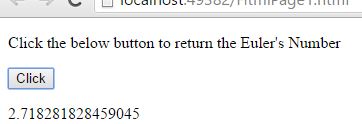
In the above code snippet we have given Id as "myId"to the second <p> element in the HTML code. There is a function myNumber() in the<script>block which is connected to the onclick of the HTML button. We need to return the Euler's number for that we are using E property. Onclick of the button "Click" in the HTML code fires the function myNuber() in the <script> block at the same time Math.E property returns the Euler's number as output.
OUTPUT