Online: 33867


 Online: 33867
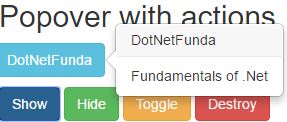
show, hide, toggle and destroy properties from which we can do actions manually for popovers.<head>
<script type="text/javascript">
$(document).ready(function () {
$(".show-popover").click(function () {
$(".popover-pop a").popover('show');
});
$(".hide-popover").click(function () {
$(".popover-pop a").popover('hide');
});
$(".toggle-popover").click(function () {
$(".popover-pop a").popover('toggle');
});
$(".destroy-popover").click(function () {
$(".popover-pop a").popover('destroy');
});
});
</script>
</head>
<body>
<h2>Popover with hover</h2>
<div>
<p class="popover-pop list-inline">
<a href="#" class="btn btn-info" data-toggle="popover" title="DotNetFunda" data-content="Fundamentals of .Net">DotNetFunda</a>
</p>
<div>
<input type="button" class="btn btn-primary show-popover" value="Show" />
<input type="button" class="btn btn-success hide-popover" value="Hide" />
<input type="button" class="btn btn-warning toggle-popover" value="Toggle" />
<input type="button" class="btn btn-danger destroy-popover" value="Destroy" />
</div>
</div>
</body>
popover-pop and we have anchor tag with class attribute as btn-info and we have given the data-toggle popover title as DotNetFunda and data-content as Fundamentals of .NETinput type button with show-popover, hide-popover, Toggle-popover, destroy-popover.popover-pop which calls the button DotNetFunda and the functions $(".popover-pop a").popover('show');- It shows the popover to the button DotNetFunda$(".popover-pop a").popover('hide');- It Hides the popover to the button DotNetFunda$(".popover-pop a").popover('toggle');- It Toggles the popover to the button DotNetFunda$(".popover-pop a").popover('destroy');- It Destroys the popover to the button DotNetFundaoutput